Add images or entire folders
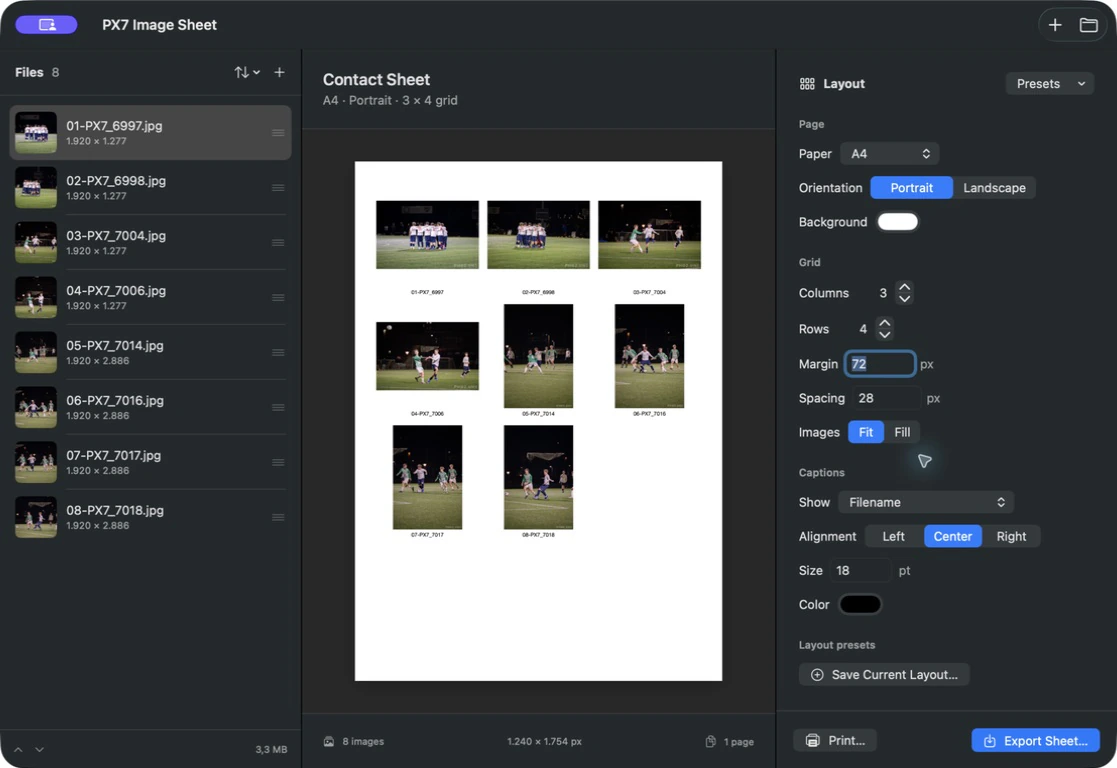
Drop in HEIC, JPEG, PNG, TIFF or WebP files. Reorder them by dragging, or sort by filename and capture date.

Folders become contact sheets.
Drop in a folder, arrange the grid and see every page before you export a polished PDF, print, PNG or JPEG.
Notarized by Apple · 3.7 MB · macOS 14+ · Apple silicon and Intel · trial needs no card
€10 one-time · no subscription · version 1.x updates · one key for up to seven Macs
brew install --cask px7digital/tap/px7-image-sheetThe public cask pins version 1.0.3 and verifies the release checksum. The dedicated distribution and support repository documents the release and provides a public issue tracker. Prefer Apple's built-in route? Read how to make a contact sheet on a Mac.
Drop in HEIC, JPEG, PNG, TIFF or WebP files. Reorder them by dragging, or sort by filename and capture date.
Choose rows, columns, margins and spacing. Fit keeps every pixel; Fill gives every cell a clean edge-to-edge crop.
Use A4, US Letter, square, 16:9 or a custom canvas in portrait or landscape. PDF and native print preserve the real paper dimensions.
Show filenames, capture dates, dimensions, camera models or a compact combination beneath each image.
The live preview uses the exact same renderer and pagination as export, so page breaks and crops never arrive as a surprise.
Store complete page, grid, caption and output presets, then bring the whole setup back with one click.
Export one multi-page PDF, print through macOS, or create numbered PNG and JPEG pages.
Sheet only creates new, collision-safe output. Nothing is uploaded, and an existing file is never overwritten.
Quick answers