Actually under the target
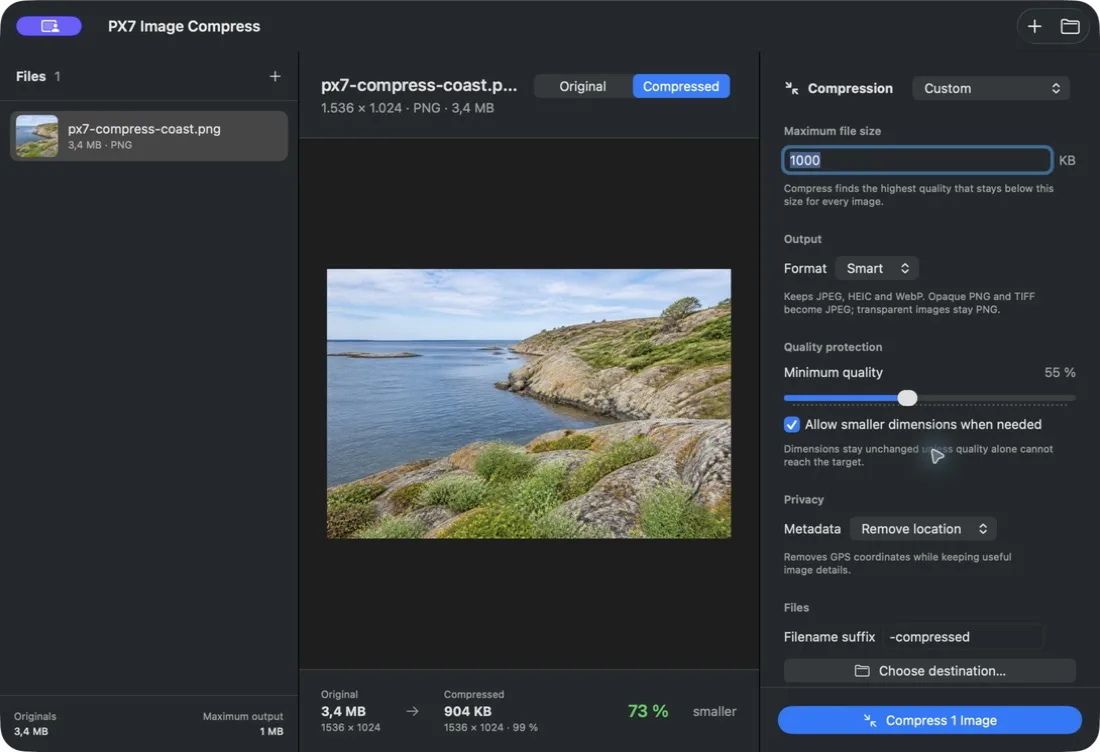
Enter 250 KB, 1 MB or any other limit. Every saved file is verified to be below it - not merely estimated. For the free Preview method and format tradeoffs, see how to compress an image to 1 MB on a Mac.

Compress images to an exact file-size limit.
Set 250 KB, 1 MB or any custom maximum. Compress finds the highest image quality that fits - for one image or a whole folder, without uploading it.
Notarized by Apple · less than 5 MB · no card · seven-day trial · €12 once · version 1.x updates · up to seven Macs
Homebrew
brew install --cask px7digital/tap/px7-image-compressThe public cask pins version 1.0.3 and verifies the downloaded ZIP against its published SHA-256 checksum. The dedicated distribution and support repository documents the release and provides a public issue tracker.
Enter 250 KB, 1 MB or any other limit. Every saved file is verified to be below it - not merely estimated. For the free Preview method and format tradeoffs, see how to compress an image to 1 MB on a Mac.
Compress searches for the highest usable quality below your limit instead of making you guess at a percentage.
Dimensions remain untouched while quality can do the job. If the limit is impossible, Compress can reduce dimensions just enough - or fail instead, if you choose to protect them.
Switch between Original and Compressed, then compare actual file size, dimensions, quality and savings before processing the folder.
Let Smart protect transparency and retain efficient source formats, or choose JPEG, HEIC, WebP or lossless PNG yourself.
Keep metadata, remove GPS coordinates, or remove descriptive metadata from every compressed copy.
Drop complete folders, choose the rule once and safely stop after the current image whenever you need to.
Compress writes new, collision-safe files. Nothing is uploaded, and an existing file is never overwritten.
Quick answers