How to compress an image to 1 MB on a Mac
Use Preview for free, or set an exact limit and finish in one pass.
For one photo, export a JPEG from Preview, lower the quality, save it, and check the result in Finder. Preview does not offer a target-size field, so repeat if the file is still too large. When a form rejects anything over 1 MB, use a target of 1000 KB to leave no ambiguity.
Free Preview method below · PX7 trial needs no card · macOS 14+
Short answer
Choose the method by how strict the limit is
- One image, approximate resultExport a JPEG from Preview and adjust its quality
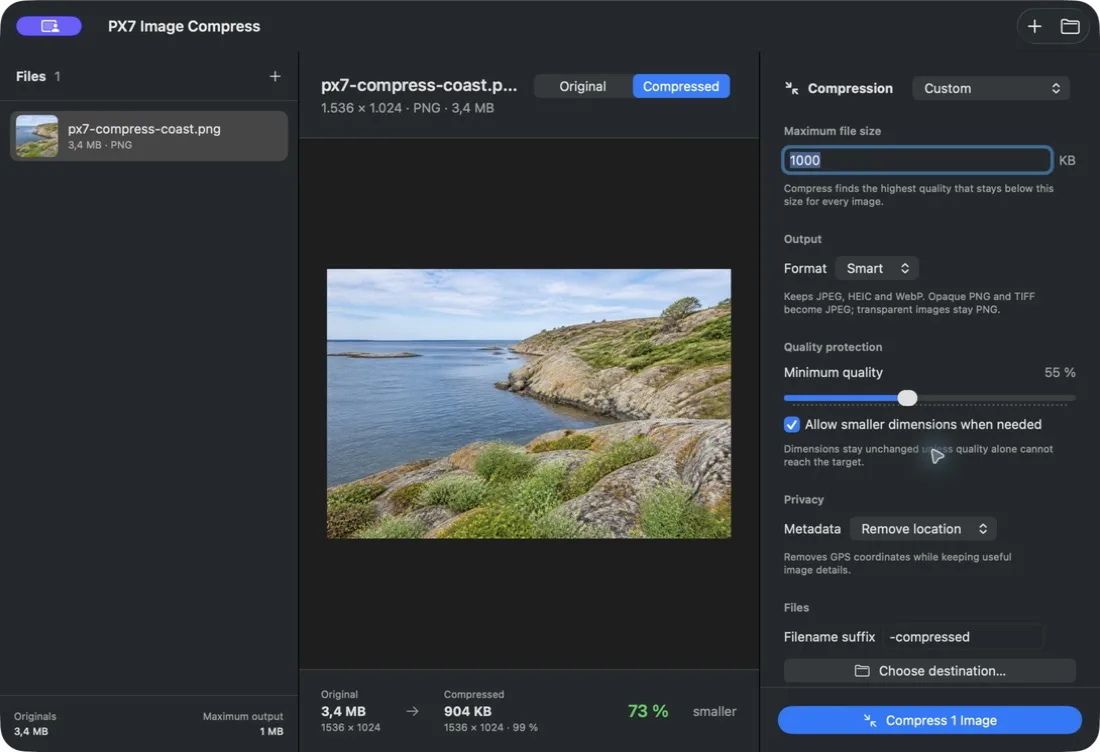
- Must be below 1 MBSet 1000 KB in a target-size compressor
- Many imagesProcess the folder against one maximum
- Transparent artworkKeep PNG or WebP; JPEG removes transparency
Free method
Compress one image with Preview
- Open the image in Preview.
- Choose File > Export.
- Choose JPEG for a photograph. Apple exposes a quality control for JPEG exports.
- Lower the quality, give the copy a new name, and save it.
- Select the exported file in Finder and press Command-I to check its size.
- If it is still above 1 MB, export again at a lower quality. If quality is already too low, reduce the pixel dimensions before exporting.
This is the right method when the job is occasional and another export attempt costs less than installing a tool. Apple also documents selecting several images in Preview's sidebar and exporting them together, but every image still uses the same manual settings.
Exact limit
Set 1000 KB when the upload must accept it
A quality percentage is an input, not a file-size promise. Two photographs saved at 80 percent quality can have very different sizes because detail and noise compress differently. A target-size compressor tests the actual output and keeps the highest quality that remains below the limit.
Seven days · no card · EUR 12 once · local processing · originals stay untouched
Or install the same notarized Universal trial with Homebrew:
brew install --cask px7digital/tap/px7-image-compressFormat choice
JPEG is usually smaller, but it is not always the right answer
Photographs
JPEG is widely accepted and gives you a useful quality control. It is usually the shortest route below 1 MB for an ordinary photo.
Transparency and sharp graphics
Keep PNG when transparency or lossless edges matter. A detailed opaque PNG can be much larger than a visually similar JPEG.
Efficient Apple photos
HEIC can stay small at good quality, but confirm that the upload form accepts it. Convert to JPEG when compatibility matters more.
Questions
Common 1 MB image questions
Is 1 MB equal to 1000 KB or 1024 KB?
Both conventions exist. For an upload form that only says 1 MB, use 1000 KB as the safer maximum.
Can I stay below 1 MB without resizing?
Often, yes. Start by changing compression quality while preserving the dimensions. Reduce dimensions only when quality alone cannot reach the target.
Can Preview guarantee a file below 1 MB?
No. Preview lets you choose JPEG quality, but it does not let you enter a target byte size. Save and inspect the result, then repeat if necessary.
Can I compress a whole folder to the same limit?
Preview can export several selected images, but it does not optimize each one for a target. PX7 Image Compress evaluates every file separately against the chosen maximum.
PX7 Digital makes PX7 Image Compress, so this guide is not neutral. The Preview steps and format options were checked against Apple's Preview User Guide on 27 August 2026. The product result shown above was produced with the public Universal 1.0.3 release on the same date. Report an outdated step.